

For years, artificial intelligence has hovered around the edges of our daily work. It could answer questions, draft documents, write snippets of code and offer suggestions. But it always stayed on the outside, watching rather than doing. Even when AI told us the right step to take, we still had to open our apps, click through menus, and manually follow through.
AI had the intelligence, but not the hands.
This gap has held back AI assistants. They’re brilliant at reasoning, but powerless when it comes to taking real action. They can’t move across your tools, touch live data, or run workflows inside your apps. Every product uses its own API, its own rules, its own data structures. And AI can’t magically understand or operate those boundaries in a safe, predictable way.
That’s the exact problem the Model Context Protocol (MCP) was created to solve.
MCP is an emerging open standard that lets AI interact directly with applications. Not just reading information, but performing meaningful actions within them. It gives apps a structured, secure way to expose their capabilities to AI models—so your assistant doesn’t only know about your tools, it can actually use them.
Imagine telling your AI to pull the latest client notes from Notion, assign follow-up tasks in Jira, message the team in Slack, and schedule the next meeting.
And everything just happens.
No switching tabs.
No copying and pasting.
No manual effort.
MCP is the bridge that makes this possible.
The Missing Link Between Intelligence and Action
AI has become incredibly good at understanding, reasoning, and planning. It can digest huge amounts of information and tell you exactly what needs to be done. But here’s the catch: it still can’t actually do those things inside your systems.
Most AI tools only generate outputs—text, ideas, summaries, instructions. Humans still have to turn those into real tasks across apps.
Why is that?
Because each app, whether it’s Slack, Notion, Jira, or anything else, sits in its own isolated world. Every tool has its own APIs, data structures, and permission rules. Without custom coding or one-off integrations, AI can’t walk into those systems and perform actions.
So even though AI can plan the work, humans must execute it.
This disconnect keeps AI stuck in an advisory role. The intelligence is there, but the interface between “thinking” and “doing” has been missing.
MCP fills that gap.
What Is MCP?
The Model Context Protocol (MCP) is a new open standard that connects AI systems with the applications we rely on every day. It gives models a way to move beyond suggestions and actually take action within real tools.
In the past, if you wanted AI to perform tasks inside an app, developers had to create special plugins or integrations. MCP simplifies that by offering a universal language apps can use to describe:
- What actions they allow
- What data they expose
- How those operations should be used
And how to do it safely
When an AI connects to an MCP-enabled tool, it instantly understands three things:
- What data exists
- What actions are possible
- How to perform those actions correctly
- That transforms AI from a passive advisor into an active participant
For example, instead of telling ChatGPT, “Remind me to email the client,” and doing it yourself, an MCP-aware AI could open your preferred email app, write the message, and schedule it—without you touching a button.
Once apps speak MCP, any model that understands the protocol can interact with them securely and consistently. No constant rework. No endless integrations.
MCP is the backbone that turns AI assistants into AI operators.
MCP Architecture Overview
MCP standardizes how AI models communicate with external applications. Instead of every tool requiring a custom API integration, MCP defines a common interaction layer that any AI can understand.
At a high level, MCP uses a client–server architecture, where:
- The model acts as the client
- Apps act as tool providers
- The MCP server orchestrates everything in between
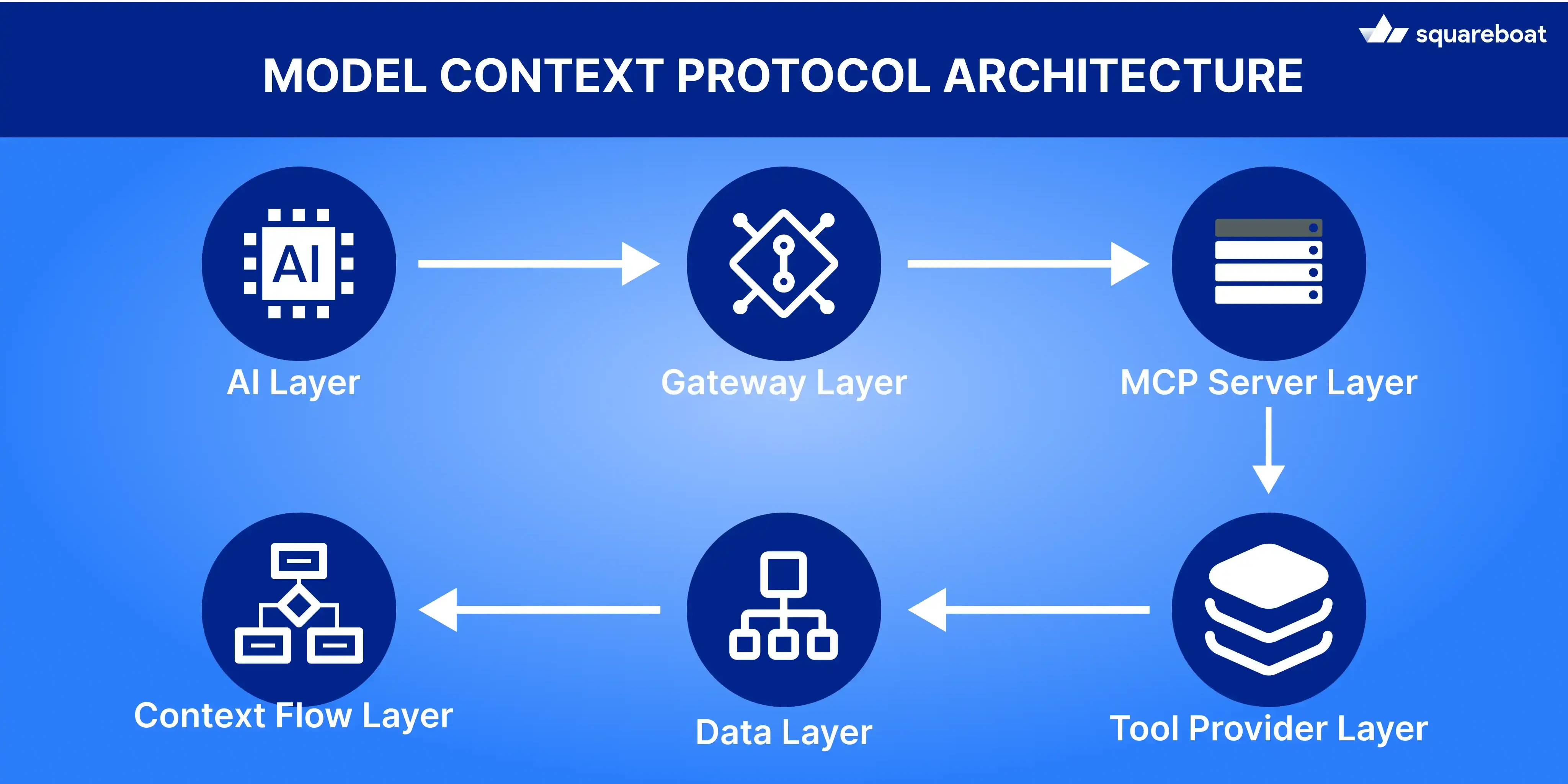
Here’s how each part works.
1. Model: The AI Layer
The model is the reasoning engine. It consumes user intent maps that intent to capabilities and sequences operations. Key responsibilities expanded:
- Intent interpretation: Convert free-form user instructions into discrete goals and sub-tasks. Like “Summarize today’s meeting and ping design” → two goals: summarize and notify.
- Tool selection: Decide which tool(s) are required and why?
- Action planning & ordering: Build an ordered plan (e.g., fetch → summarize → post) and include contingencies (if Notion is unreachable then ask or use cached notes).
- Parameter resolution: Fill required parameters from context (e.g., meeting date from session and channel ID from workspace metadata).
- Result reasoning & chaining: Interpret structured responses and decide follow-ups (if summary > N words, create short TL;DR and post).
The model doesn’t talk directly to app APIs. It sends structured requests to the MCP Client that keeps communication predictable and secure.
2. MCP Client: The Gateway
The MCP Client is the translator between the model and the protocol. It takes the model’s reasoning and turns it into schema-compliant MCP calls.
- Intent translation: It takes the model’s natural-language reasoning and turns it into a clean, structured MCP request the system can execute.
- Schema validation: The client checks every parameter against the tool’s schema to ensure types, required fields, and permissions are correct before the call is sent.
- Session management: It maintains context across multiple steps in a single workflow, so the model doesn’t need to repeat workspace IDs, auth tokens or temporary state.
- Request execution: After validation the client forwards the request to the MCP Server in the right format and attaches session metadata.
- Response interpretation: It wraps server responses into a consistent structure the model can understand, making it easier to continue reasoning or plan the next action.
- Error handling: If a call fails the client returns a clear and normalized error so the model can retry, ask for missing details or adjust its next steps.
- Safety guardrails: The client enforces permissions, rate limits and safe-call checks to prevent the model from invoking tools in unsafe or invalid ways.
Think of it as the API adapter on the AI’s side of the bridge.
3. MCP Server: The Orchestrator
The MCP Server sits in the center and coordinates everything.
Key responsibilities:
- Routing: The server directs each MCP call to the correct tool provider and manages communication across the system.
- Permission checks: It enforces access rules and validates whether the user and session have the right scopes for the requested action.
- Data validation: The server double-checks structure, types and parameters before forwarding the request to ensure predictable behavior.
- Error normalization: Any tool-specific error is converted into a consistent, protocol-friendly format that the client and model can understand.
The server abstracts away app-specific complexity so the model can treat every tool the same way.
4. Tool Provider: The App Layer
Any application—Slack, Notion, GitHub, or an internal enterprise system—can act as a Tool Provider in MCP. It exposes a set of actions the server can call on behalf of the AI.
For example, a Notion provider might offer capabilities like:
- create_page(title, content and parent_id)
- update_page(page_id and properties)
- query_database(filters)
Each capability is defined through structured schemas that outline:
- the accepted parameters and their data types.
- expected outputs and response formats.
- required authentication or permission scopes.
This setup gives AI models a clear map of:
- what the app can do
- what inputs it needs
- what results to expect
without any integration work.
5. Data and Context Flow
When a user gives an instruction such as "Add today's meeting summary to Notion and notify the team on Slack," the action traverses the system in a predictable chain:
User Input → Model:
The model interprets the request and works out which steps must occur.
Model → MCP Client:
It sends a structured intent for the client to translate.
MCP Client → MCP Server:
The client converts that into a valid MCP request and sends it to the server.
MCP Server → Tool Provider:
The server routes the call to the correct app along with session details and permissions.
Tool Provider → MCP Server:
The app executes the action and returns a structured response.
MCP Server → Client → Model:
It travels back up the chain, thereby providing the model with what it needs to continue the workflow or respond to the user.
This flow ensures that the model won't just plan tasks but will be able to execute them reliably via a controlled and secure protocol.
6. Why This Architecture Matters
This structure makes MCP:
- Extensible: Add new tools without retraining models.
- Secure: Every layer validates data and permissions.
- Interoperable: Any model can use any MCP-enabled app.
- Scalable: Thousands of tools, no direct integrations required.
In short, MCP becomes the plumbing layer that connects AI reasoning to real-world action.
How Communication Happens in MCP
At its simplest, MCP is a message-passing system. The AI states what it wants to do, and MCP ensures that request is executed safely, accurately, and in context.
Let’s break down how this communication works.
1. The Communication Pipeline
Every request follows the same cycle:
Step 1: User Intent → Model Understanding
The process begins when the user gives an instruction. The model interprets the request, identifies which apps are involved, and turns the natural-language command into an actionable plan.
It then prepares a structured request that follows the schemas defined by each tool.
Example:
A user says: “Create a new GitHub issue for the frontend bug and assign it to Alex.”
The model recognizes GitHub as the target app, decides the needed action is create_issue, and extracts details like title, description, and assignee.
Step 2: Model → MCP Client
The model sends this structured request to the MCP Client, specifying:
- The tool name (e.g., “github”)
- The method or action (“create_issue”)
- The input parameters (title, description, assignee)
The client validates that all inputs conform to the tool schema before passing it forward.
Step 3: MCP Client → MCP Server
After validation, the client converts the request into a protocol-compliant message and passes it to the MCP Server.
The server becomes the central coordinator and ensures that the request reaches the right tool provider.
Example:
The client sends a JSON-formatted call like:
- tool: github
- action: create_issue
- input: { title, body, assignee }
Step 4: Server → Tool Provider
The MCP Server routes the call to the correct app’s tool provider. It also attaches context such as session details, authentication, and permissions.
The Tool Provider then performs the requested action inside the actual application.
Features of this step:
- App-side execution (e.g., creating the GitHub issue)
- Schema-based input handling
Authenticated and permission-checked operations
Step 5: Response → Back to Client → Back to Model
Once the app finishes the action, the result is returned to the server, passed back to the client, and delivered to the model.
The model uses this result to continue reasoning or replying to the user.
Example:
GitHub returns:
- issue_id
- issue_url
status: success
The model may then say: “Your issue is created. Here’s the link.”
Step 6: Model Reasoning & Chaining
This structured pipeline ensures that the AI doesn’t just understand tasks, it can execute them across any compatible app.
Every layer adds validation, context and control, keeping the entire interaction reliable.
Benefits:
- Safer action execution
- Consistent structure across tools
Easy integration of new apps without retraining models
2. Message Structure
Every MCP request and response uses a predictable JSON-based structure. That keeps communication transparent and easy for models to understand.
A typical request looks like this:
And a typical response:

Message Structure
3. Context Management
One of the biggest strengths of MCP is how it keeps track of context across multiple actions. This is what lets AI handle multi-step tasks and coordinate smoothly between different apps.
- Session Context: Everything related to a workflow—user info, permissions, and in-progress states—is shared across requests. The AI always knows where it left off.
- Tool Context: Each app can add its own details, like workspace IDs, project names, tokens, etc. so actions happen in the right place.
- Result Chaining: The output from one tool can automatically feed into the next. This lets the AI chain actions together without you having to step in.
In short, MCP remembers what’s happening and passes along just the right info, so tasks flow seamlessly from start to finish.
4. Error Handling
MCP also standardizes error communication.
Each failed request includes structured error codes and messages — allowing the AI model to decide whether to retry, correct parameters, or ask for clarification.
For example:

Error Handling
In this way the AI can handle issues smoothly, for example:
"Looks like I don’t have access to GitHub at the moment. Do you want me to re-authenticate or try another app?"
By using this structured approach, interactions stay safe, recoverable, and predictable—exactly what’s needed for reliable autonomous workflows.
5. Event-Driven Support
MCP doesn’t just handle one-off requests—it can also react to events in real time. This means your AI can go beyond answering prompts and start responding automatically as things happen in your apps.
How it works:
- Apps send “events” to the MCP Server. Examples include:
- New message received in Slack
- File updated in Notion
- CI/CD pipeline failure in a dev tool
The AI model can subscribe to these events. Once something happens, the model gets notified and can take action immediately, without waiting for a user prompt.
Real-world examples:
- Meeting notes logging: After a calendar event ends, the AI automatically summarizes the meeting and adds it to your Notion workspace.
- Dashboard updates: When new data arrives, dashboards refresh automatically, keeping your team in sync.
- Team alerts: If a CI/CD pipeline fails then the AI notifies the relevant Slack channel so the right people can take action.
Security, Permissions and Trust
When AI starts taking real actions inside apps, security becomes non-negotiable. MCP’s design ensures the model can act — but only within defined, auditable, and safe boundaries.
1. Scoped Access:
Each app exposes limited capabilities (scopes) through MCP — e.g., create_task, read_data, but not delete_user. Every AI request is validated against these scopes before execution.
2. Authentication Control:
User credentials (OAuth tokens, API keys) stay encrypted on the MCP Server — the model never sees them. The model only receives symbolic session handles, ensuring indirect, controlled access.
3. Validation and Sandboxing:
All requests are schema-checked for structure, type, and permissions. Servers can even run in sandbox mode for sensitive actions like deletions or financial operations.
4. Human Oversight:
Organizations can enforce checkpoints — e.g., “auto-approve Slack messages” but “require confirmation for record deletions.” MCP allows fine-grained human-in-the-loop control.
5. Logging and Auditability:
Every request and response is logged with metadata (session ID, tool, timestamp, status). This enables transparency, replayability, and compliance auditing.
6. Isolation and Trust Boundaries:
Each workflow runs in its own sandboxed session. The model itself is treated as untrusted — all real execution flows through trusted MCP Server and Tool Providers.
Why it matters:
By combining scoped access, validation, logging, and sandboxing, MCP lets AI operate autonomously without compromising safety or control. The system can act intelligently while staying fully accountable and secure.
MCP in Action: A Real Workflow
Let’s see how MCP makes cross-app automation smooth and reliable. Suppose you ask:
"Summarize today’s meeting notes from Notion and send a Slack update to the team."
Here’s how it plays out behind the scenes:
1. User Intent → Model Understanding
The AI parses the instruction and identifies two tools — Notion (data source) and Slack
2. Request Creation
It formulates an MCP request for Notion:

Request Creation
3. MCP Flow
The MCP Client validates and sends the request to the MCP Server.
The Notion Provider executes the query and returns structured data (meeting notes).
The model summarizes this content internally.
4. Chained Action
Next, the model crafts another MCP request for Slack:

Chained Action
5. Execution and Response Handling
- Once the Slack request is received.
- The MCP Server verifies the call against Slack’s exposed schema and scopes (ensuring the model has permission to post messages).
The Slack Provider executes the request, sending the update to the designated channel.

Execution and Response Handling
The provider then returns a structured response such as:
- The Server logs this action, ensuring full traceability.
- The Client delivers this back to the model, which interprets it as “Task completed successfully.”
This multi-layer confirmation ensures that each step — from request validation to execution — is deterministic, logged, and verifiable, preventing unintended or duplicate actions.
6. Context Continuity and Chained Reasoning
One of MCP’s most powerful features is its persistent context — allowing the model to maintain shared information across tools within a single session.
- The same session ID tracks all related actions (Notion query → Slack post).
- Variables like project_name, meeting_date or participants remain accessible between tool calls.
- The MCP Server manages this context, automatically passing relevant metadata to each subsequent request.
This allows seamless reasoning chains, where the model can say:
“I’ve summarized today’s notes, now let me check if tomorrow’s meeting is already scheduled.”
All within the same conversational thread, without the user having to restate details or reauthorize tools.
In essence, MCP creates a stateful bridge between reasoning and execution — enabling autonomous, cross-application workflows that still remain transparent and secure.
Technical Advantages of MCP
MCP isn’t just another integration tool—it’s like giving AI a universal operating system for your apps. By standardizing how AI models interact with software, it makes workflows smarter and more scalable. Here’s why it stands out:
1. Unified Interface Across Apps
- One protocol replaces dozens of custom APIs
- Same model logic works across Slack, GitHub, Notion and internal tools
Tools share a standard schema (method, params, result)
2. Context-Aware Automation
- Session context (user, workflow, past results) is preserved automatically.
- Enables multi-step, intelligent behavior across tools.
Allows chained actions without re-auth or re-prompting.
3. Modular & Extensible Design
- Add new tools by defining schemas — no model changes needed.
- Internal systems can be exposed safely like public APIs.
Decouples model intelligence from tool implementation.
4. Built-In Security & Governance
- Protocol-level validation and access rules.
- Define permissions and data access via config, not code.
Supports human-in-loop control where required.
5. Scalable & Interoperable
- Works for small tasks or enterprise-level workflows.
- Stateless schema-based architecture scales horizontally.
Any MCP model ↔ any MCP provider - no vendor lock-in.
6. Future-Ready for Agentic AI
- Gives models real access to real systems.
- Enables autonomous task execution and planning.
- Forms the backbone for safe agentic AI in production.
Hands-On with MCP: Build Your First Workflow
In this example, we’ll simulate how MCP allows an AI model to reason across multiple tools — just like an autonomous agent would — while keeping all calls structured, secure, and traceable.
1. Install Dependencies

2. Configure Discord Connection

3. Initialize the MCP Server

4. Fetch GitHub Issues Tool

5. Analyze Issues Tool
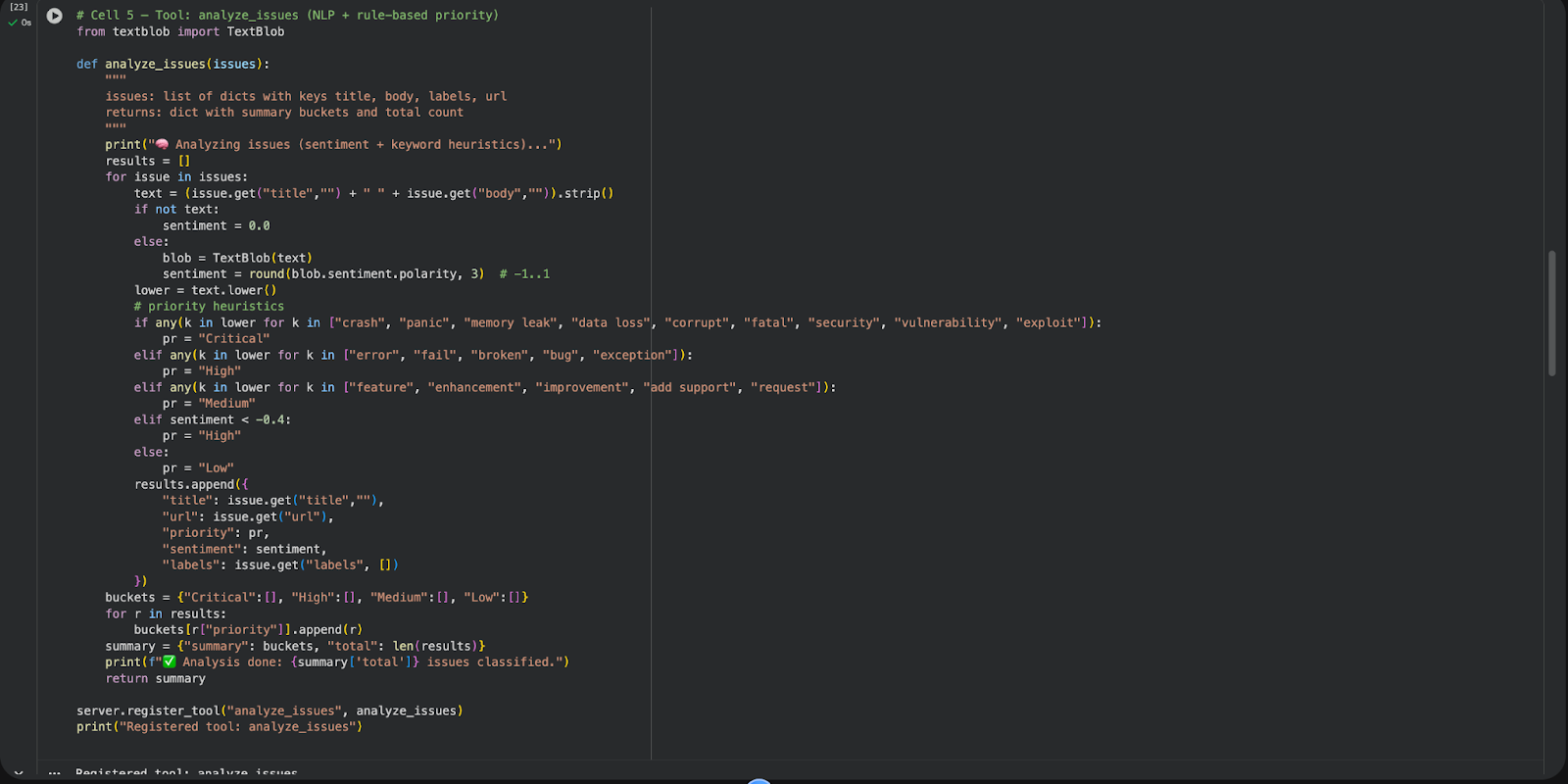
6. Send Discord Message Tool

7. AI Orchestrator: The Workflow Brain

8. Run the Complete MCP Workflow

How This Works
1. Structured Calls
Every action goes through MCP as a typed JSON-RPC request. This keeps interactions predictable and avoids messy, error-prone string parsing.
2. Chained Reasoning
The AI sequences tasks step by step - fetch data → summarize → post. Each step’s output informs the next, forming the basis for agentic, autonomous behavior.
3. Abstraction Layer
Your model doesn’t need to know the specifics of Slack or GitHub APIs. It only interacts with high-level functions like fetch_github_issues, summarize_issues, and send_slack_message.
4. Security and Control
All tools are sandboxed and strictly defined. The AI cannot go beyond its allowed operations.
Conclusion: The Future of Software Is Model-Native
MCP isn’t just a developer convenience. It reshapes how software is built, connected, and used.
Until now AI sat around our apps.
With MCP AI starts living inside them.
MCP gives models a common language to interact with any tool - securely, consistently, and with full context. Developers expose functionality once, and any AI model can use it. Workflows turn into self-running systems. Models don’t just think; they act.
As we move into a world of agentic AI - where systems can plan, reason, and execute with small or even zero prompts—MCP becomes the foundation layer that makes it possible.
It connects intelligence to action.
And that changes everything.

Anubhav Jain is a Technical Lead with 6+ years of experience building scalable web and mobile apps. At Squareboat, he drives engineering, architecture, full-stack development, and technical excellence to ensure smooth, high-quality project delivery.

